
I get it, it is really tempting to dictate a prompt, press a button and generate a ready to publish article or credit memo. With this AI approach, you don’t have to deal with writer’s block or all the mess involved in creating documents. Unfortunately, the deluge of AI writing has created such a toxic aversion to “AI writing” that today, it gets your email or proposal thrashed without as much as a second glance.
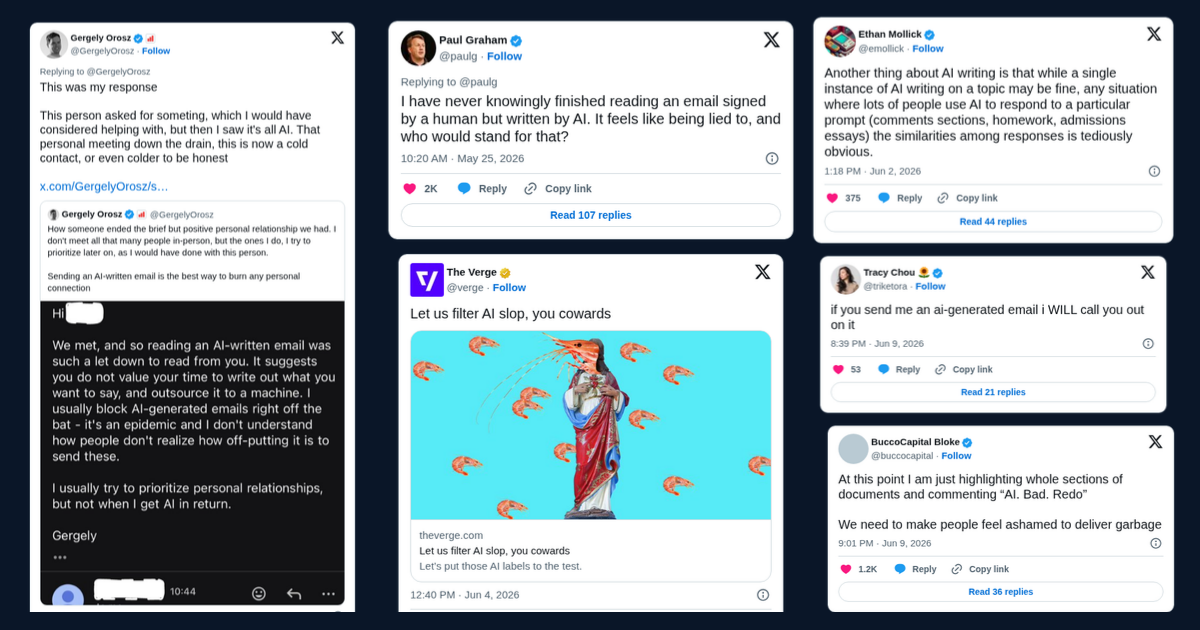
The negative reaction AI-generated writing creates has been there for a while but is steadily increasing at the same rate as “AI slop” increases all around us. All of a sudden it seems no one is writing their own emails, social media posts and comments. All of these now appear to be AI-generated with the obvious robotic, over-engineered rhetorical flourishes. Last week we reviewed an obviously AI-written blog, what makes it a horrible read and all the tell-tale signs.
Does that mean you shouldn’t use AI for your writing? Given it appears to be counter productive? Not at all, in fact I use AI a lot in my writing and my work. AI has been a massive force multiplier for social media posts, blogs and long form writing. But the trick is this, every output carries my personality and is MY document, and cannot be classified as AI-generated. This deep dive will help you reap the efficiency and “creativity” benefits of AI in creating emails, credit memos and other long form documents.
What are you trying to achieve with your writing
Behind every business writing is an objective you’re trying to achieve and it’s either you want to inform, persuade or connect. Let’s look at each of these:
Provide information: like most parents, one of the most essential type of emails in my life are the almost daily school notifications. These contain information about pick up and drop off, extra-curricular activities, learning calendars and other logistics. This type of writing delivers the facts and information without bothering about emotion or trying to persuade. Other types of informational writing include internal project status updates, onboarding documents or training manuals.
Persuade: when a deal team presents investment committee papers or a company management team presents to the board, the objective is to obtain a decision in their favour. This type of writing is tricky because the language is formal but it also has to connect emotionally. Cover letters, negotiation emails, fundraising pitch decks or investment memos, cold outreach emails and project proposals also fall in the category.
Connect: for many senior professionals, this forms the bulk of what they do. A text message here and a WhatsApp there and you win the deal. Thank you notes, some cold connect messages on LinkedIn, customer service emails are just some of the other connection type communication
It’s worth noting that many documents in real life have elements of the three objectives to varying degrees. For simplicity, we have assumed a clean split. Now that we’ve covered the basics of business writing, the next question is should we automate these?
Which types of business writing should you automate?
So considering the three tSo considering the three types of documents and the current state of AI capabilities in June 2026, which of them do you think can be fully automated with AI and which need to be exclusively human drafted?
There are a lot of factors that really matter on whether a document should be fully automated or not: consequences of errors, level of standardisation, regulatory compliance, relationship and complexity involved. For simplicity, let’s look at this on a 2X2 matrix of stakes and level of customisation required.
Stakes: one way to think about this is: “what’s the worst that could happen if we make a mistake?” Is it, “oops”, here’s the correct version or do we lose our bonuses for the year?
Customisation: if you have a rigid set of inputs (say, documents from the VDR) and a fixed template for output, then this requires minimal customisation. On the other hand, where both inputs and outputs vary, then a high level of customisation is required.ypes of documents and the current state of AI capabilities in June 2026, which of them do you think can be fully automated with AI and which need to be exclusively human drafted?
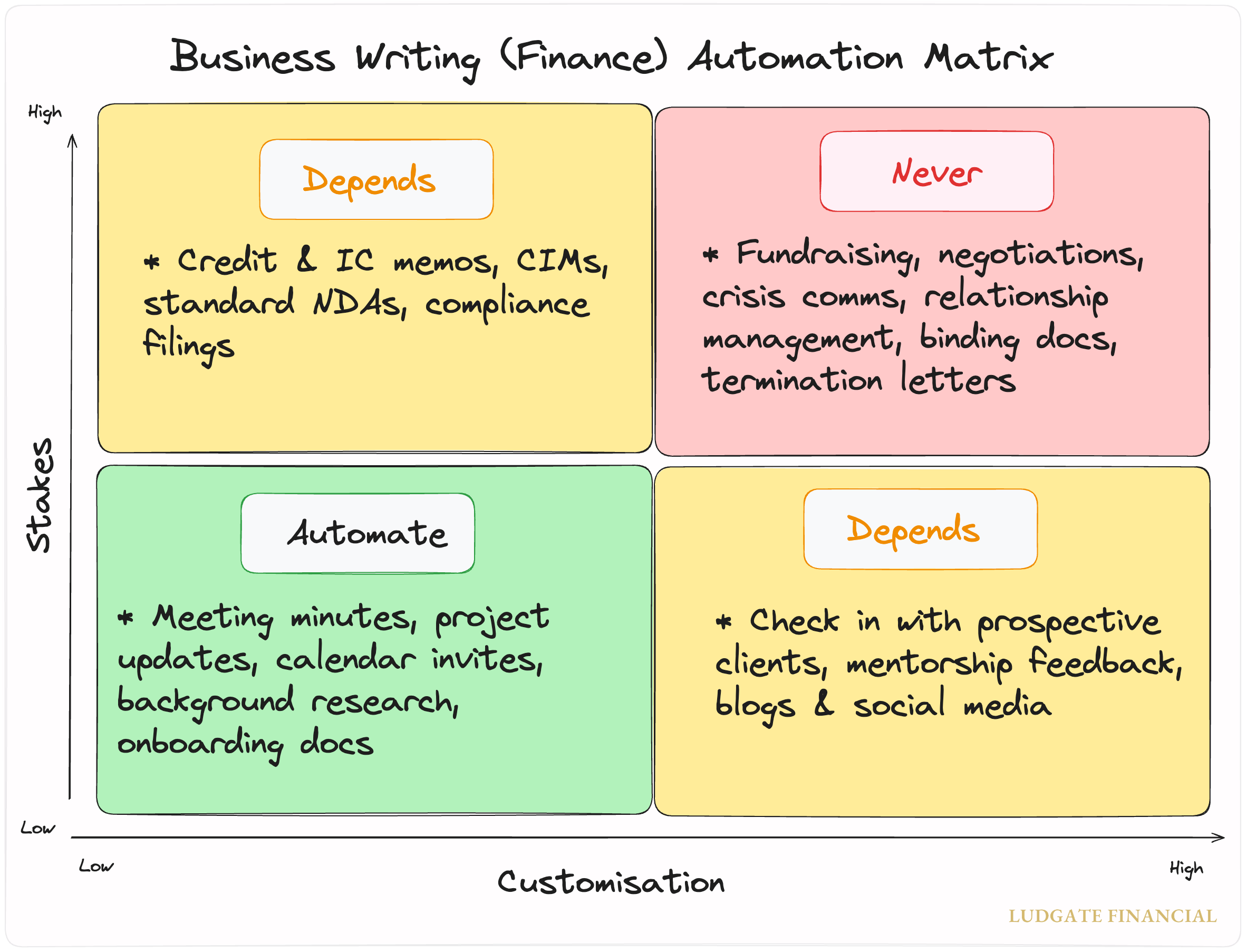
2 × 2 Writing Matrix
With that in mind, this is what it looks like on our 2x2 matrix:
Automate: when the stakes are low, you have tightly bound inputs and there is a standard output template then it’s easy to fully automate the document. For instance, converting a meeting recording into transcripts is done automatically by most AI-powered meeting tools these days. Converting into your custom format is a matter of setting up once. Project updates, background research and onboarding emails fall into this category.
Depends (upper): when the cost of getting it wrong is high but there is little requirement for customisation, handing over to AI to automate fully is possible but should be handled with care. Also worth noting that documents listed in this quadrant sit on a spectrum. A standard one pager compliance filing that feeds from your monthly financials and churns out a report in a fixed format is different from a credit memo which generally follows a fixed format but requires judgement and intuition.
Depends (lower): a “nice to meet you” note after meeting a prospective client at networking event seems such a low stakes output that the temptation to automate is real. So are blogs, update emails to your boss and social media posts. Nothing catastrophic happens if AI hallucinates and you’re caught out on one of these. The catch is that a lot of customisation is required to get these working well every time, otherwise the writing gets thrashed without a second glance. In the next section, we will take a look at the fix for these two “it depends” sections and how to automate parts of writing workflows.
Never: to be fair to AI, even the most experienced CEOs and senior executives have badly fumbled layoff announcements when speaking in person. Richard White, the billionaire founder and executive chairman of Australian company, WiseTech, recently said live: "It doesn't take much effort to convince people, in the end, that they're stupid to be paying $100 for labour when you can pay $2 for the AI." In this quadrant, we have high stakes, high personalisation documents and tasks that require extreme care, though we say “NEVER”, I’d say use AI sparingly and if you must apply the “messy middle” framework.
How to apply AI to business writing without sacrificing your voice
There are two broad approaches to AI in business in general and which particularly applies to writing, those who think AI is the best invention since electricity and those who think AI is worthless. Ironically, both sides of the divide are joined at the hip in making the same expensive mistake - blindly applying AI to tasks. For example, many investment firms are spending huge sums of money on building AI agents to fully automate their financial modelling, risk analysis all the way to credit and IC-submissions. Perhaps we will get there someday but AI isn’t there yet. A better approach is to use AI where it’s genuinely strong and continue to build a workplace where employees can use AI as tools, just like other tools they’ve had in the past.
Let’s take a quick look at the relative strengths and weaknesses of LLMs as at June 2026.
AI tools are really powerful with advantages over humans
Long-context retrieval: the ability to “read” and hold a massive amount of text in its memory and extract a specific fact buried in that data. For instance, identifying the number of environmental risks disclosed within a 225-page information memorandum (IM).
Summarisation: the ability to take a complex document and boil it down to its key points without losing substance.
Semantic extraction: the ability to understand what text means, and pull out the specific items you ask for. Back to IM, you could query all instances of customer concentration and you’ll get an accurate count whether it’s called “reliance on key accounts,” or “top-ten customer revenue.”
Style transfer: taking a piece of content and express it in a different tone or level of formality. For instance, dictating rough recollection of meeting and AI returns a draft credit paper.
Pattern recognition: spotting irregularities within large bodies of text. When you combine this with semantic extraction, this is a powerful and useful strength in business writing.
With these impressive strengths, life would be magical if that’s all about AI. Alas, that’s not the case and these tools have some massive weaknesses compared to humans.
…but also some pretty significant disadvantages
Hallucination: this is the one that everyone knows but still get caught out on. AI has the tendency to make things up, and present the invention confidently. It’s that annoying, remarkable inability to say “I don’t know.”
Sycophancy: no matter how hard you try, AI will tend towards agreeing with whatever position you hold rather than disagree even if actual facts support that. It’s like a loyal best friend who never sees anything wrong in what you do or say.
Positional bias: the tendency to pay close attention to the start and end of a long document and skim the middle. For instance, an AI summary of the 225-page IM we mentioned is likely to miss items from the “key risks” in the middle while accurately picking up details from the intro and conclusion.
Instruction drift: once your thread gets long, the model forgets earlier instructions and reverts to defaults. This is one of my most frustrating experiences with AI that keeps me screaming all the time. BUT I TOLD YOU [x], WHY ARE YOU GIVING ME [Y]?
Homogenous outputs: the tendency to draft text in a rigid way it construes as “proper” means when you prompt a tool to correct your email to your boss, or draft a cover letter, it will drift toward the same average, generic style, stripping out personality quirks. This is the core weakness behind why it’s easy to spot “AI-writing” and what gets people so mad.
I created an interactive comparison radar chart so you can rank yourself against AI on five skills essential to business writing. Take the test here (be honest) and feel free to share your results.
The trick is to “co-author” with AI, keeping the parts that make you “you” and using AI to help with others
Now that we know where AI is strong and humans have a distinct advantage, this makes this next “how to” almost predictable. Let’s consider writing as four distinct steps from start to finish.
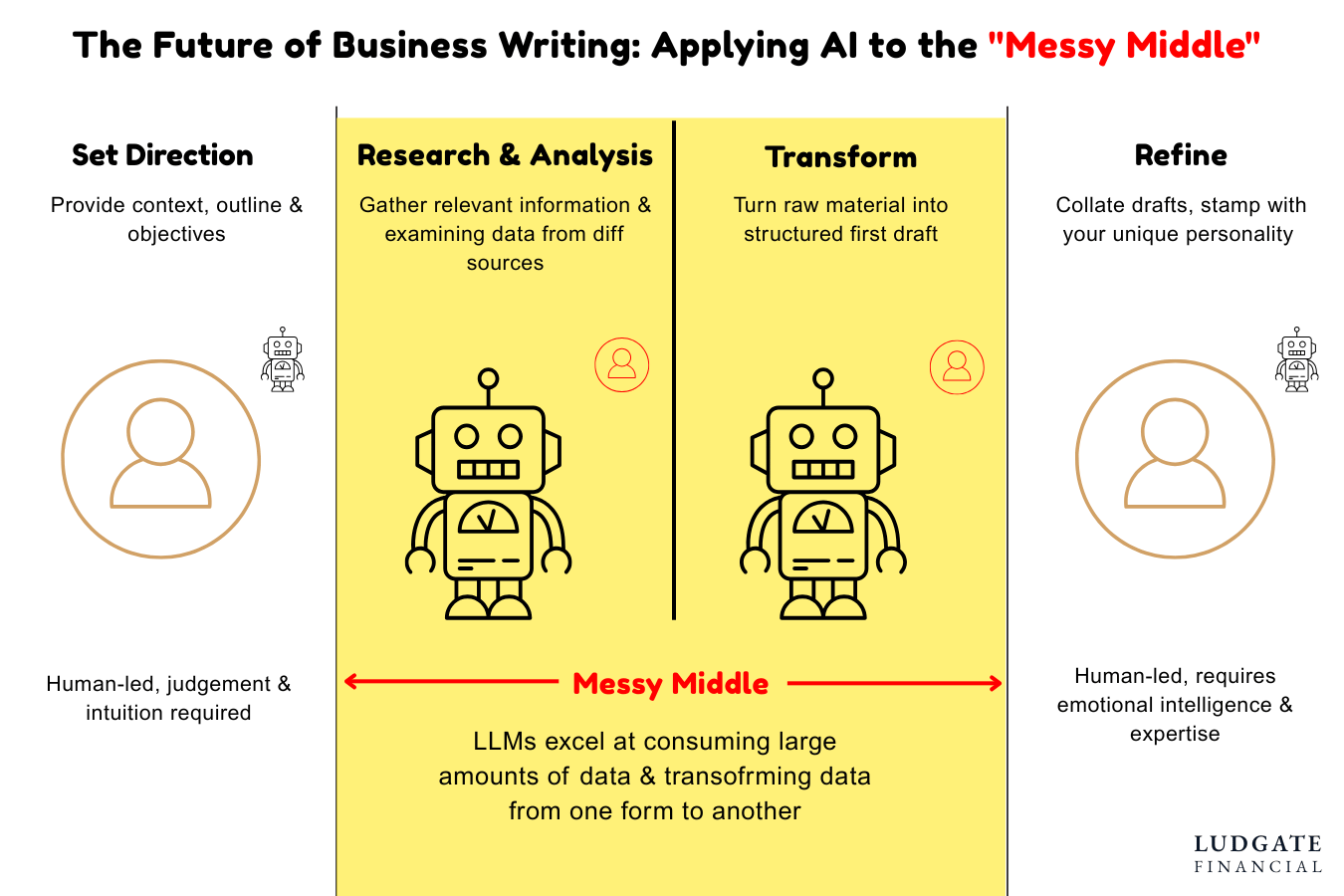
Messy Middle Framework
Which brings us to the messy middle framework which I use as a rough guide on what is safe to delegate to AI and what I absolutely have to write. Any business writing can be decomposed into these four distinct stages:
Setting Direction: like building a business, knowing what to write is often the most important step. When you choose to “create” an email, article or investment committee memo, you are trying to achieve a specific objective. Humans have an advantage here as this step is more emotional than rigid and the path to achieving those objectives are unique to each individual. For instance, I prompted ChatGPT, Claude and Gemini as an experiment on what I wanted to achieve with this deep-dive. You can see for yourself the outline they created compared to the outline I eventually crafted based on my personal experience, emotional connection to the topic and intimate knowledge of my audience.
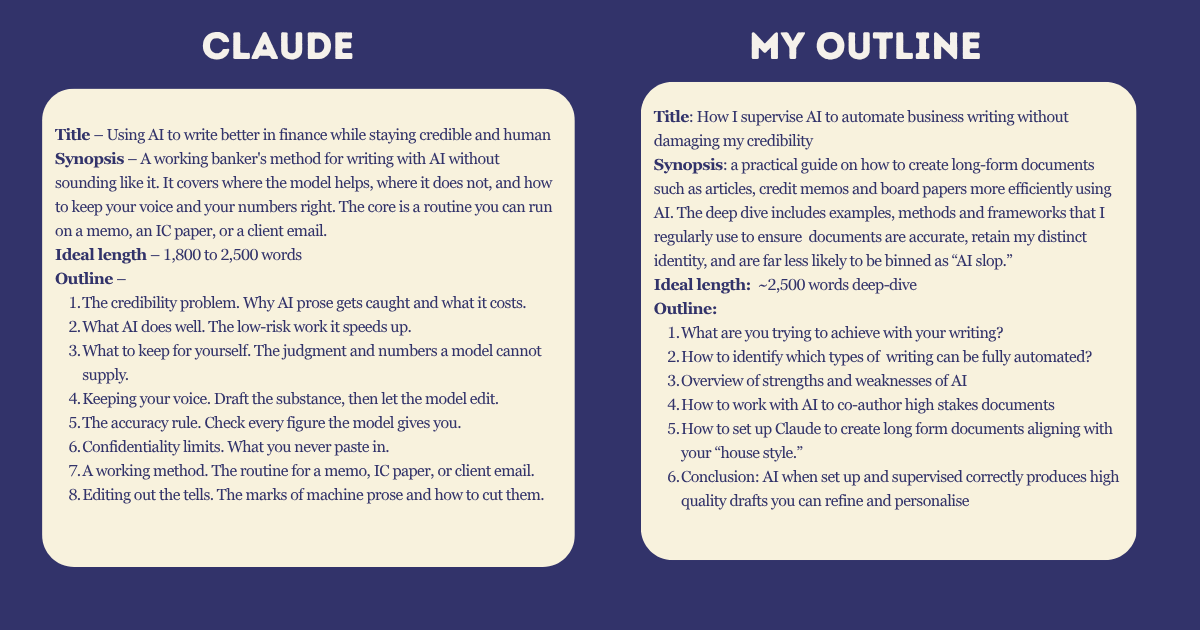
Comparing outlines
What do you notice about the two? Which would you rather hand a superior to pitch this piece, and why? What specifically does the custom outline do that the AI version cannot? Click here for the full analysis.
2. Research and Analysis: once you are clear on what the final output must look like to achieve your objectives, the next step is where the grunt work begins. All business writing requires a set of inputs which could be ready made or totally scattered. For instance, for a credit or investment committee memo, the inputs such as financial model, credit policies, management meeting notes etc are available in one place (say shared drive). At the other extreme, it’s all scattered. For instance, when I started writing this deep dive, there wasn’t a single document available anywhere. All the context existed in my head and I needed to put pen to paper to “create” this document.
At different points, I needed data, public anecdotes, definitions and other inputs to support my ideas. Claude, Gemini and ChatGPT came in handy.
AI’s strengths make a big difference here whether the inputs are structured or unstructured. A well structured prompt can scan hundreds of pages of input for all risks, compare against credit policy and identify red flags, leaving you with raw materials starting to take shape.
3. Transform: this is where it all starts to come together and like the last section, AI has a distinct advantage in running the show here in turning raw material into a first draft. Let’s assume we are a Lead Arranger on one of the year’s biggest deals, Paramount’s acquisition of Warner Bros. Discovery. The deal has changed several times as the drama unfolded between rival bidders.
For a quick summary to update senior management, a team of analysts and associates will need several hours to pull facts from the unstructured inputs. With the right AI tools and methods, the same team can perform the task in minutes instead.
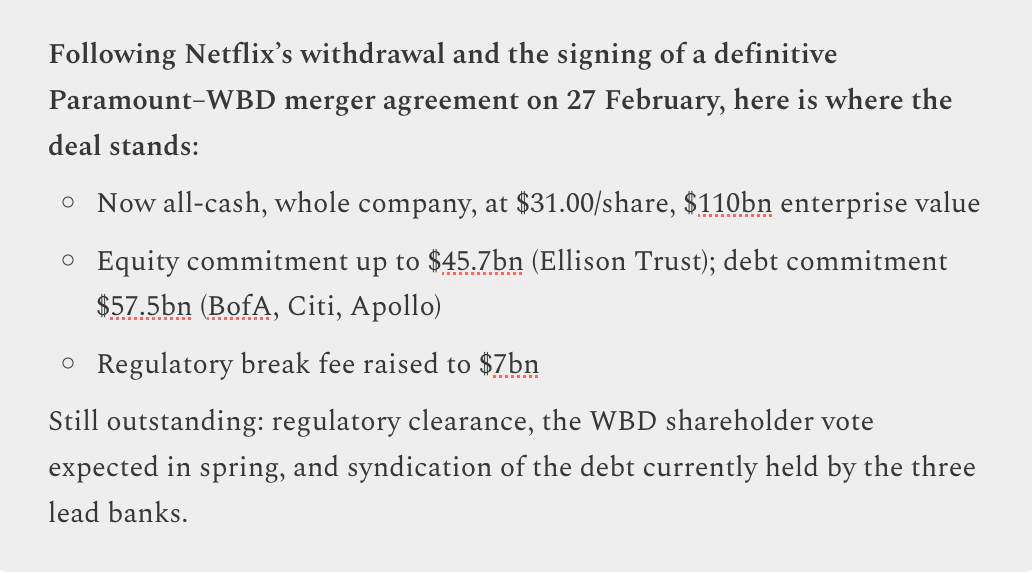
4. Refine: stage 4 of our framework is simple (but not easy). The task is to go through the draft with a fine-tooth comb, ensure all facts are accurate and that the final version comes across uniquely in your voice. For instance, in the Warner Bros deal, refining will include ensuring any output is 100% accurate but also aligns with your firm’s style guide. For my own writing process for this piece, I had Claude produce a first draft of this paragraph which I then rewrote completely in my voice. What do you notice between my version and Claude’s?Refine: stage 4 of our framework is simple (but not easy). The task is to go through the draft with a fine-tooth comb, ensure all facts are accurate and that the final version comes across uniquely in your voice. For instance, in the Warner Bros deal, refining will include ensuring any output is 100% accurate but also aligns with your firm’s style guide. For my own writing process for this piece, I had Claude produce a first draft of this paragraph which I then rewrote completely in my voice. What do you notice between my version and Claude’s?
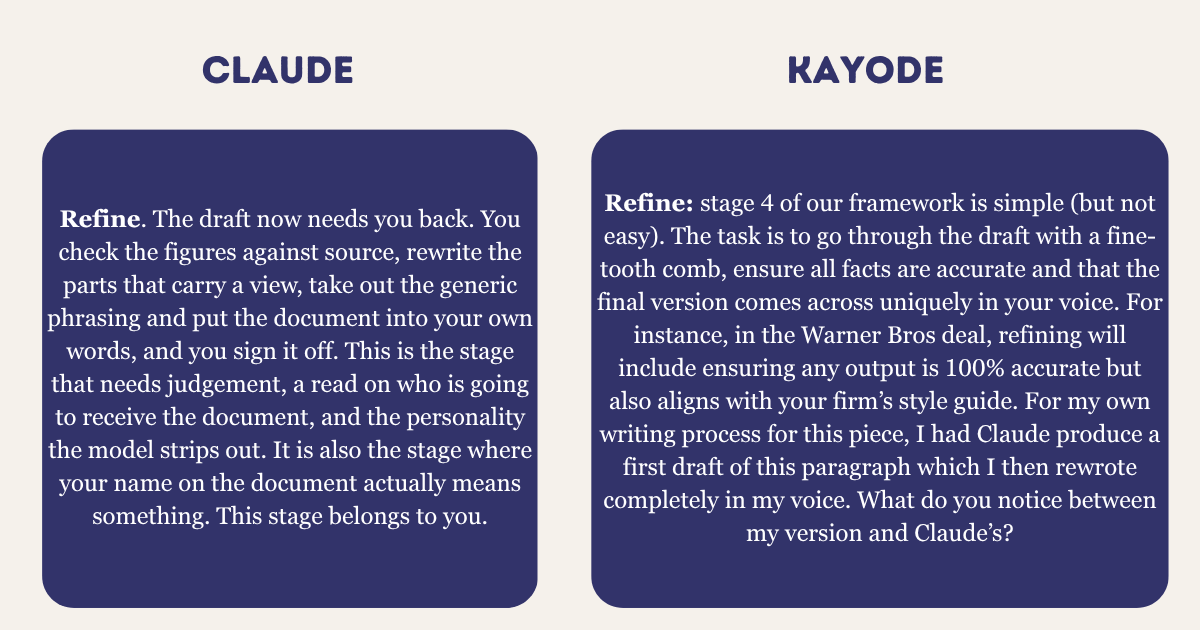
For a simple deal update paragraph, the process of refining isn’t such a big deal. But think about 25-page memos and other long form documents, refining bland AI drafts could be very time consuming. But we can also customise AI with our preferences so it guides the drafts. Which brings us to the last section of this piece.
How to set up Claude to support teamwork and produce output that aligns with your "house" style
To arrive at the deal summary for the Warner Bros transaction in the section above, I went through a total of 11 prompts. The initial output had all the information but the style, formatting and approach need lots of back and forth to arrive at a version that was presentable. Imagine having to refine a complex document with multiple prompts, it becomes too complex and definitely less effective when running full document at once.
What if you could set up personal and firm style preferences into the AI workflows so that the same output can be achieved with just one prompt?
The good news is that the major AI tools especially have advance functionality created specifically for this scenario. For this demonstration, we will set up Claude to give you consistent outputs with at least 80% fewer prompts. Let’s run through the definitions before we dive into the set up
Chat: the standard conversation interface, allowing users to add text, voice, and image instructions.
Projects: self-contained workspaces with their own chat histories and knowledge bases. Think of this like a shared drive or project folder which holds context of deals and clients. Projects include instructions which allow further customisation and knowledge base which allow all chats within the project to share common documents.
Skills: custom instructions that extend Claude's capabilities for specific tasks or domains. I have a writing skill saved which describes my writing style in excruciating detail.
Now let’s get you set up:
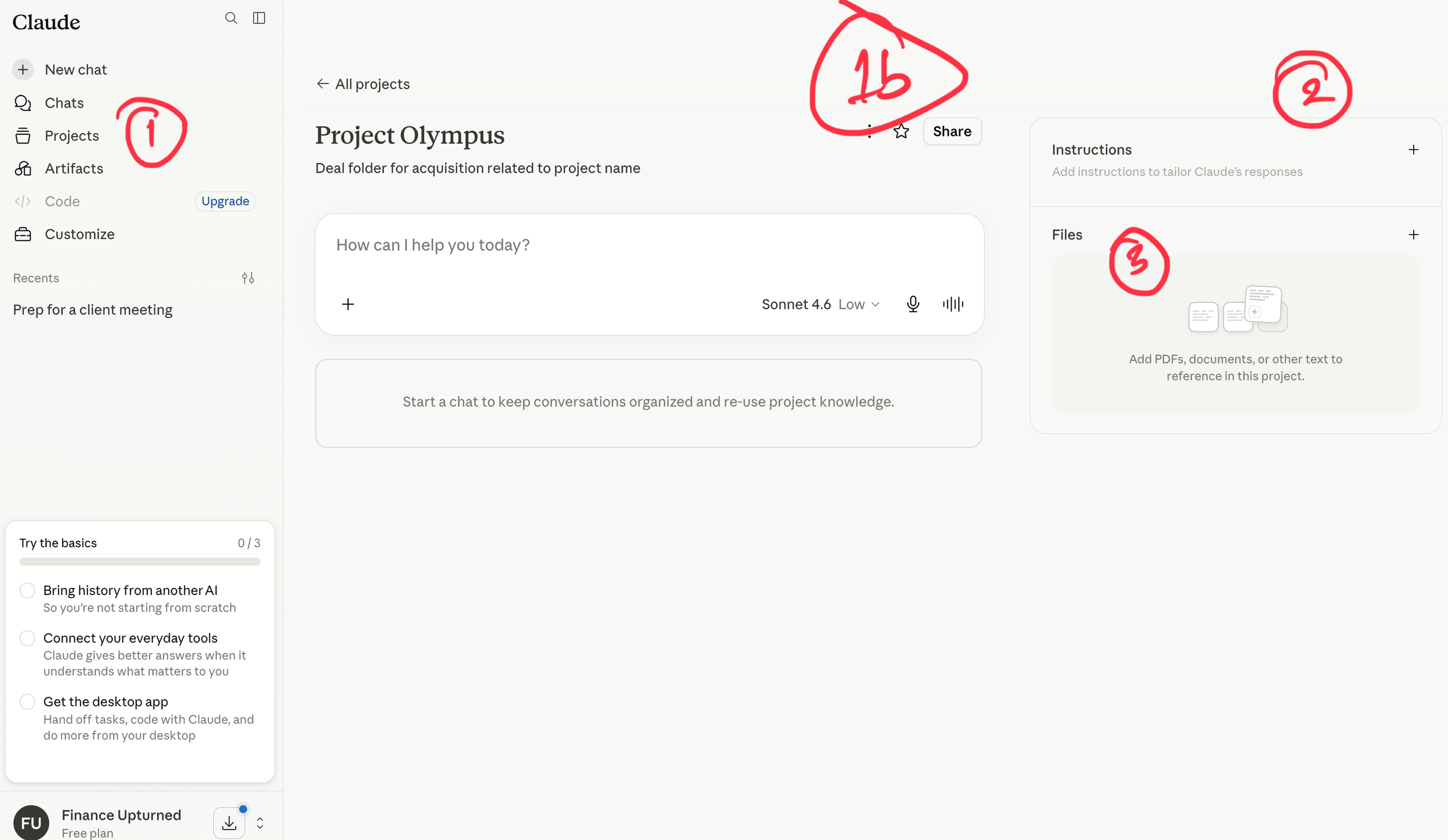
Create the project: click Projects in the left sidebar, then “New project” in the upper right. Name it as you wish and add any descriptive text which could be useful when you have many projects. On a Team or Enterprise plan you'll also choose whether it's private or shared with colleagues. Once your project is set up, you can create chats within the project.
Set project instructions: on the right, add instructions for how you want Claude to behave and respond within the project. For our purpose we will include a role, memo formats and constraints such as using only project knowledge documents as input.
Upload files into project knowledge: just under the Instructions is the Files which allows you to upload necessary documents such as memo templates, sample memos, credit policy document and other deal inputs. All these become available as context to all chats and users who have access to the project.
3. Create chats or move existing chats into project: if you have existing chats outside the project you’d like to move in, you can do this by clicking on the dropdown arrow next to the chat name, then “Add to project.”
4. Enable code execution and file creation: you need to enable code execution and file creation for Skills to work. Go to Settings, then Capabilities, and enable code execution and file creation.
5. Create skills: skills shone when applied to specialised tasks, the more specific the better. What it means is that skills be complex to get right, so the most efficient way to create them is to use Claude. On the left pane, click on Customize > Skills> “+” > Create with Claude.
For the credit memo skill, I added a few sample memos and asked Claude to decipher the structure, formatting and writing style. As part of the Claude skill writing, I also requested a template to check the quality of the skill. We had a bit of back and forth and eventually arrived at a comprehensive set of skills which I was happy with.
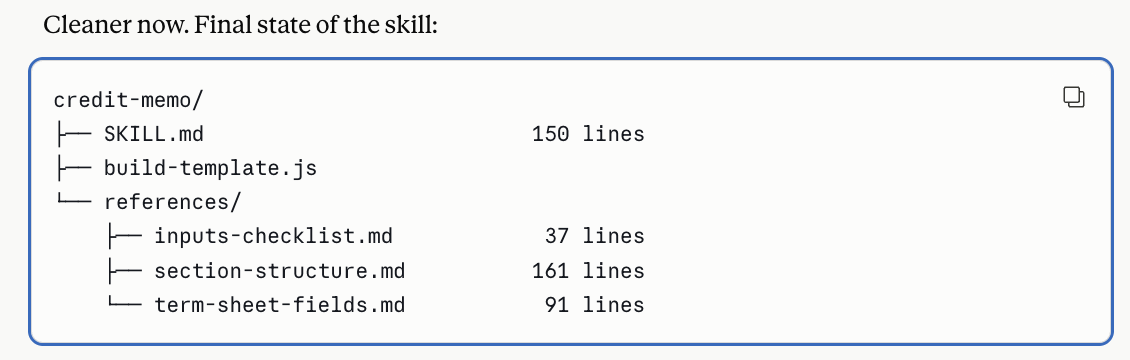
If you want to compare notes or need help with the skills process (what I described here is simplified process), feel free to get in touch.
7. Activate skills: the last step in the process is to ensure your skill is activated. click on Customise > Skills> choose skill in middle tab, ensure the sliding button is on (blue) at extreme right of page.
With skills set up properly like this, I’m able to generate long-form business content that takes me much closer to a document that looks like mine. To reiterate, the goal is NOT to fully automate creation of documents where the stakes are high such as fundraising, investment committee submission and so on. The objective is for AI to produce a working document in your chosen style, with the fewest prompts that you can then refine and finalise.
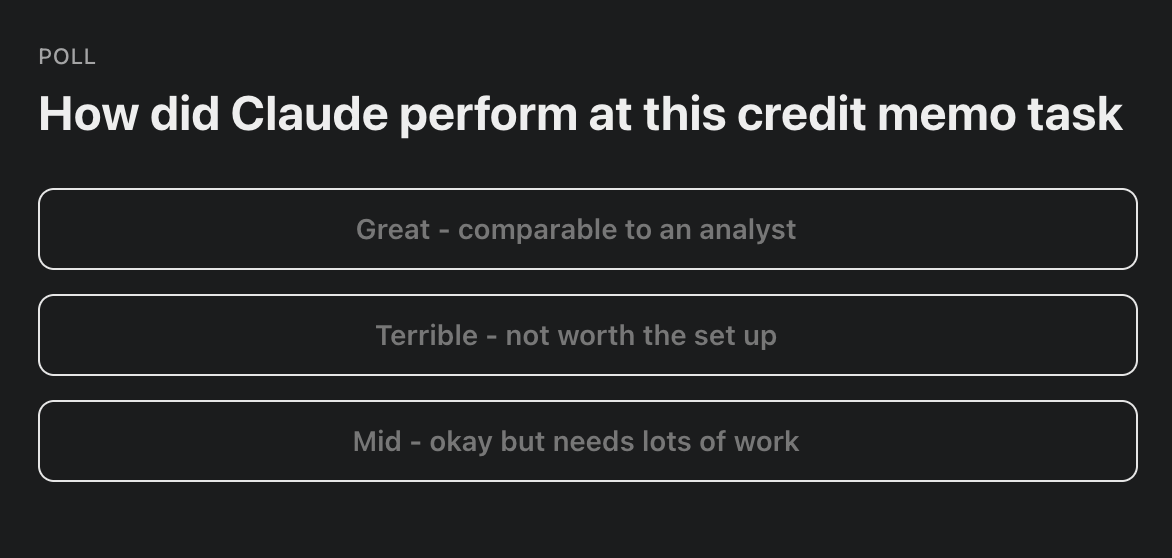
I followed all the steps in this deep-dive and tested it on a full (simulated) credit memo based on the Paramount / Warner Bros deal we touched on earlier. To see the full output, check it out here and let me know how you’d rank AI’s “one-prompt” attempt at a complex document.
Thank you for subscribing and for spending time on this deep dive. If this has been useful to you, be a good friend, colleague or family member and share.
If you’d like to discuss private AI coaching for your top executives from someone who’s been on both sides of the finance and technology divide, drop me an email.
Kayode
